HashCore Toolkit v1.7.0

HashCore Toolkit Download

Official HashCore software for ASIC miner management

Download HashCore Toolkit to discover, monitor, diagnose, and operate ASIC miners from one local-first interface. Built for real mining operations, from small rooms to large, multi-container deployments.

50,000+
Devices per instance
150+
Supported models
4
Platforms
100%
Free toolkit

Download HashCore Toolkit for Every Platform

Official HashCore download links for Windows, Linux, macOS, and Android. Use this section for the current HashCore Toolkit release, then follow the installation guide for first-run discovery.

Version reference: v1.7.0 · Last content refresh: May 14, 2026 · Open the full HashCore download page

What Makes HashCore Different

HashCore Toolkit focuses on the daily work of ASIC farm operators: fast discovery, live visibility, safe bulk control, and reliable diagnostics.

Fast fleet discovery

Scan and classify large miner networks quickly, then save dynamic logical groups for daily operations.

Operator-grade monitoring

Track hashrate, thermal behavior, pool state, and device status with views designed for busy operations teams.

Bulk control workflows

Apply pool, tuning, and maintenance actions across many devices with clear task progress and actionable error signals.

Diagnostics and history

Investigate unit-level issues while keeping an auditable history of who changed what and when.

Local-first architecture

Operate in your own environment with minimal cloud dependency, supporting high-availability site operations.

Ecosystem fit

Toolkit works alongside broader HashCore software lines, including Firmware, Proxy, and Pulse initiatives.

Software Stack

Built for real mining operations

HashCore Toolkit is the local operations layer for day-to-day miner control. It is commonly paired with firmware, proxy, and cloud observability workflows depending on farm architecture and uptime targets.

Use it when you need HashCore software for local ASIC miner management, not a cloud-only dashboard or a single-vendor setup tool.

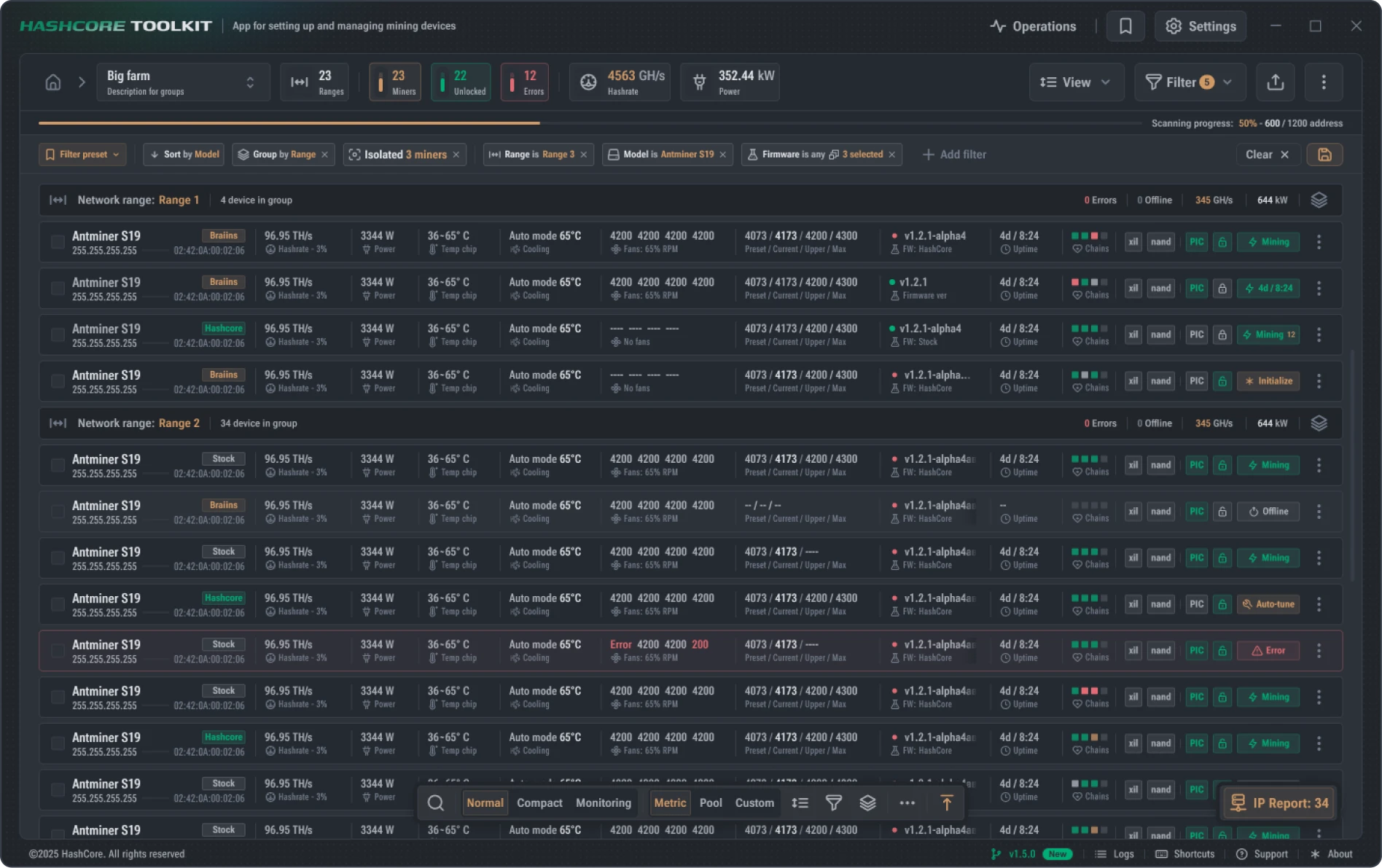
HashCore Toolkit dashboard interface showing fleet of ASIC miners with hashrate metrics

HashCore Ecosystem

Toolkit is part of a broader industrial mining stack that includes firmware, proxy, and enterprise observability tooling.

Toolkit v1.7.0

Cross-platform miner management for discovery, monitoring, and mass operations.

Firmware v1.2.7

Performance-focused firmware workflows for supported ASIC models.

Proxy v1.0.0

Stratum traffic aggregation and stability controls for larger deployments.

Pulse v0.7.0-alpha

Enterprise-scale observability and cross-site control plane direction.

Docs and API

Operational documentation, commands, and support workflows for teams.

Enterprise Support

Custom rollout workflows and priority support pathways for industrial clients.

What HashCore Toolkit does for your fleet

From the same dashboard above: fleet visibility, scanning, bulk control, diagnostics, filters, and full audit history — built for operators running real production sites.

Dashboard Overview

One screen for fleet status, alerts, hashrate trends, and live task activity across every group.

Scan and Discover

Discover thousands of miners across subnets and grouped IP ranges in seconds — no spreadsheets needed.

Bulk Operations

Apply pool changes, reboots, firmware updates, and maintenance to thousands of miners in one action.

Powerful Filters

Filter by model, status, hashrate, firmware version, location, or custom tags — instantly.

Advanced Diagnostics

Detect failing chips, faulty hash boards, and recurring error patterns before they hit revenue.

Audit History

Full change log of every action and event for compliance, traceability, and team accountability.

Setup Videos

Helpful setup tutorials for ASIC onboarding and web-interface configuration. These are supplementary videos for learning workflow patterns.

S19 Full Setup Guide

Hardware bring-up, first networking, and baseline checks.

Antminer Web Interface Walkthrough

Pool configuration, control panel basics, and common settings.

Start-to-Finish Onboarding

Practical setup sequence from unboxing to stable operation.

Supported ASIC Miners

HashCore Toolkit works with 150+ models across the major ASIC manufacturers. Manage Bitmain, MicroBT, Canaan, and more from a single fleet view.

Bitmain Antminer

S19, S19 Pro, S19j, S19j Pro, S19 XP, S21, S21 Pro, S21 XP, T19, T21, L7, KA3, KS3, K7, E9 Pro, and more.

Full read/write support for hashrate, pool config, firmware, and chip-level diagnostics on Bitmain Antminer models.

MicroBT Whatsminer

M30S, M30S+, M30S++, M50, M50S, M50S+, M53, M56S, M60, M60S, M61, and more.

Bulk pool switching, firmware management, and live monitoring across the full Whatsminer lineup.

Canaan Avalon

A1166, A1246, A1346, A1366, A1466, AvalonMiner Q, A14, A15, and select sibling models.

Discover, group, and operate Canaan Avalon fleets alongside other manufacturers in one toolkit.

Other Brands

iPollo, Goldshell, Innosilicon, StrongU, FusionSilicon, Bitfury, and more.

HashCore Toolkit's auto-detection covers most modern ASIC firmware revisions without per-model setup.

Looking for a specific model? Check the FAQ or contact us — new firmware support is added regularly via the changelog.

Frequently Asked Questions

Common questions before downloading HashCore Toolkit.

Is HashCore Toolkit free to use?

Yes. HashCore Toolkit is available as a free download for all supported platforms.

Which operating systems are supported?

Windows 10/11, Linux (Ubuntu/Debian/CentOS), macOS 11+, and Android 8.0+.

Can HashCore run without cloud dependency?

Yes. Toolkit is designed around local-first operation, allowing control inside your own network environment.

Where can I find setup instructions?

Visit the Installation and Documentation pages for step-by-step guidance.